 EarLocAlert
A warm bus on the way home, you close your eyes for a second — and the view outside is suddenly unfamiliar. You’re two or three stops past yours, waiting for a bus back.
It happens to everyone on a tired day. Rather than fighting sleep, it’s more reliable to have something that wakes you up.
What you can try without an app
Each of these works to a degree, with clear trade-offs.
- A time alarm — set it for your usual travel time. Simple, but traffic or a late bus makes it ring too early or too late, and a ringing phone isn’t great on a quiet bus.
- Announcements and stop displays — fine when you’re awake, easy to miss when you’re asleep or listening to music.
- Map app navigation — shows where you are, but only if you keep checking the screen. Useless once you doze off.
Why location beats time
The same bus route takes a different amount of time every day. So the reliable trigger isn’t ‘in 25 minutes’ but ‘when I get near my stop’.
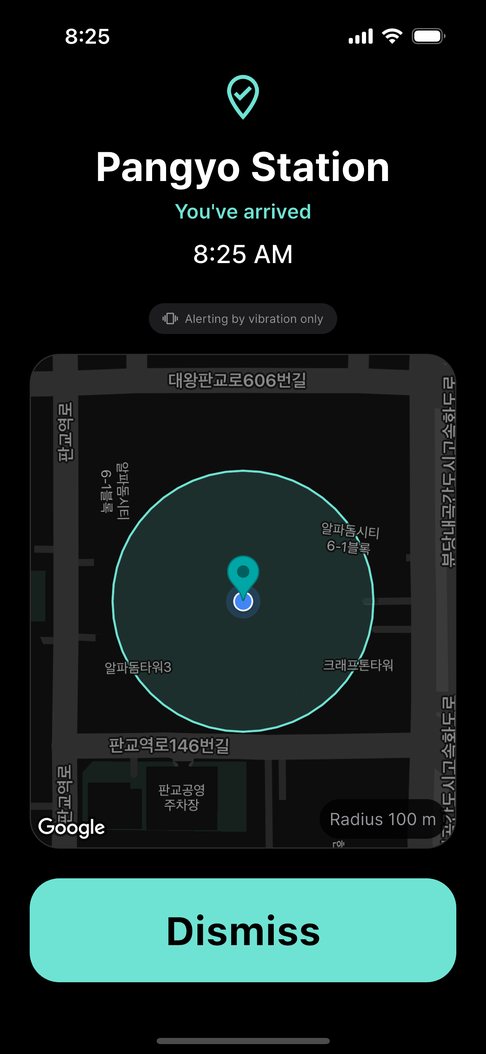
A location alarm draws a circle around your stop and alerts you the moment you enter it. Traffic jams and early arrivals don’t change where your stop is.
Setting it up in EarLocAlert
You only set it up once. After that, you never need to open the app.
- Pin your stop on the map and save it as an arrival alert.
- Choose the radius while you see the circle. Buses move fast, so give yourself a little extra distance to get ready to get off — smaller in the city where stops are close together, larger on express routes.
- Set the vibration to Strong so you feel it even in a pocket.
- With earphones in, you also hear the alert through them. Without earphones it only vibrates — it never uses the speaker.
- Only riding on weekday evenings? Set days and hours so it stays quiet on weekends.
FAQ
What radius should I use?
There’s no single right answer. Think about how fast the bus travels between stops and how long you need to get ready, start generous and shrink it after a ride or two. You can choose anything from 50 m to 2 km.
Do I need to keep the app open?
No. Once a place is saved, it watches in the background and alerts you even with the app closed and the screen off.